

Introduction
Python has become one of the most popular programming languages in the world because it is simple to read, powerful to use, and flexible enough for nearly every type of project. From automation scripts and websites to machine learning and data science, Python powers countless tools used daily. But before creating amazing projects, every beginner must first understand how to run code in python correctly.
Many people install Python and then pause because they are unsure what to do next. They wonder whether they should use the command prompt, a code editor, a notebook, or an online platform. The good news is that Python offers multiple ways to run programs, and each option is useful depending on your goals.
This guide explains everything in a beginner-friendly tone. You will learn how Python executes code, where to write programs, how to launch them, how to fix common errors, and how to build confidence through regular practice. By the end, you will know exactly how to run code in python with ease.
Why Learning to Run Python Code Is Important
When beginners think about programming, they often focus only on writing syntax. However, writing code is just one part of the process. The real learning begins when you run your code and see results.
Execution helps you understand:
- Whether your logic works
- Where errors happen
- How Python reads instructions
- How user input behaves
- How outputs are displayed
Every successful programmer improves through testing and repetition. Once you understand how to run code in python, you gain the freedom to experiment, learn faster, and create real solutions.
What You Need Before Running Python
Before you run your first program, you need a few basic things prepared.
Install Python
Download the latest stable version of Python from the official Python website. It is available for Windows, macOS, and Linux systems.
During installation on Windows, select the option:
Add Python to PATH
This step helps your computer recognize Python commands in the terminal.
Check the Installation
After installing, open Command Prompt, PowerShell, or Terminal and type:
python --versionor:
python3 --versionIf Python is installed correctly, you will see a version number.
Choose Where You Want to Code
You can run Python using:
- Command line
- Python IDLE
- VS Code
- PyCharm
- Jupyter Notebook
- Browser-based tools
Each option works well depending on your comfort level.
How Python Executes Code Behind the Scenes
Python is an interpreted language. This means it reads and processes your instructions line by line through the Python interpreter.
The process usually looks like this:
- You write code in a file or console
- Python checks syntax
- It converts code into bytecode
- Python Virtual Machine executes it
- Output appears on screen
This system allows quick testing and fast development. That is one reason beginners enjoy learning how to run code in python.
Method 1: Run Python in Interactive Mode
Interactive mode is one of the easiest ways to start.
Open your terminal and type:
pythonThen you may see something like:
>>>Now enter:
print("Hello World")Press Enter, and the output appears instantly.
Why Interactive Mode Is Useful
Interactive mode is excellent for:
- Practicing syntax
- Testing formulas
- Trying small code snippets
- Learning commands quickly
Because results appear immediately, many students first understand how to run code in python through this method.
Limitations
Interactive mode is not ideal for larger programs because code is not automatically saved.
Method 2: Run a Python Script File
Most practical Python work uses script files.
Create a file named:
hello.pyWrite:
print("Welcome to Python")Save the file. Then open terminal in the same folder and run:
python hello.pyThe program executes and prints output.
Why Script Files Matter
Script files are better for:
- Real projects
- Reusable programs
- Long code blocks
- Organized development
Anyone serious about how to run code in python should become comfortable using .py files early.
Method 3: Run Python with IDLE
IDLE is Python’s built-in editor and shell. Many installations include it automatically.
It provides:
- Simple code editor
- Interactive shell
- Run Module option
- Syntax coloring
To use it:
- Open IDLE
- Click New File
- Write code
- Save file
- Click Run > Run Module
Best For Beginners
IDLE is excellent for learners who want a friendly environment without installing advanced tools.
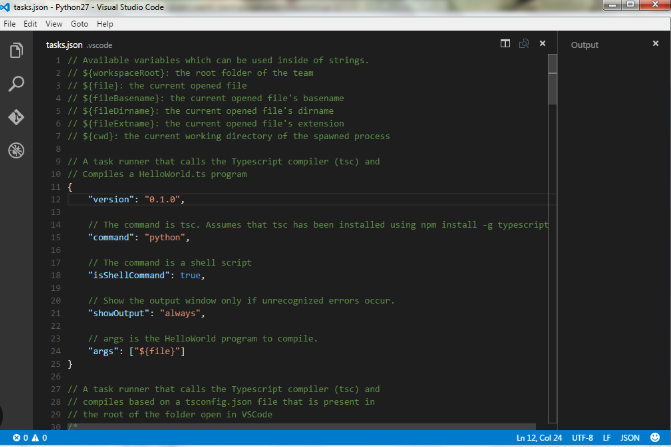
Method 4: Run Python in Visual Studio Code
Visual Studio Code is one of the most popular editors for programmers.
It combines simplicity with powerful features.
Benefits of VS Code
- Clean interface
- Python extension support
- Integrated terminal
- Auto-completion
- Debugging tools
- Git integration
After installing Python extension:
- Open your project folder
- Create
.pyfile - Click Run button
Many learners move here after mastering the basics of how to run code in python.
Method 5: Use Jupyter Notebook
Jupyter Notebook is popular in education and data science.
Instead of one large file, it uses cells. You run each cell separately.
Install Jupyter
pip install notebookLaunch It
jupyter notebookA browser window opens where you can create notebooks.
Why It Is Popular
Jupyter is excellent for:
- Data analysis
- Charts
- Machine learning
- Teaching
- Step-by-step experiments
If you enjoy visual learning, Jupyter makes how to run code in python feel intuitive.
Method 6: Use Online Python Platforms
If you do not want to install software, online tools help.
Popular platforms include:
- Replit
- Programiz
- Google Colab
- PythonAnywhere
Simply open the website, write code, and press Run.
Advantages
- No installation needed
- Works on school computers
- Fast for practice
- Easy sharing
Disadvantages
- Internet required
- May have usage limits
- Slower than local tools sometimes
Still, many beginners first learn how to run code in python online.
Comparison Table of Python Execution Methods
| Method | Best For | Difficulty | Internet Needed | Good for Beginners |
|---|---|---|---|---|
| Interactive Shell | Quick tests | Easy | No | Yes |
| Script Files | Real programs | Easy | No | Yes |
| IDLE | Learning basics | Easy | No | Yes |
| VS Code | Full development | Medium | No | Yes |
| Jupyter Notebook | Data science | Medium | No | Yes |
| Online Compiler | Instant practice | Easy | Yes | Yes |
How to Run Python on Windows

Windows users commonly use:
- Command Prompt
- PowerShell
- VS Code
- PyCharm
Open Command Prompt and type:
pythonTo run a file:
python app.pyIf Python is not recognized, reinstall it and ensure PATH was enabled.
How to Run Python on macOS
Many Mac users use Terminal.
Use:
python3For script files:
python3 app.pymacOS often uses python3 instead of python.
How to Run Python on Linux
Linux often includes Python already.
Check version:
python3 --versionRun scripts:
python3 file.pyLinux users often enjoy Python for automation and system tasks.
Common Errors Beginners Face
Learning how to run code in python also means learning how to fix mistakes.
Python Not Recognized
Error:
python is not recognizedReinstall Python and add PATH.
File Not Found
Error:
can't open fileNavigate to correct folder:
cd DesktopThen rerun command.
Syntax Error
Example:
print("Hello"Missing bracket causes failure.
Fix
Check punctuation carefully.
Indentation Error
Python depends on spacing.
Wrong:
if True:
print("Hi")
Correct:
if True:
    print("Hi")
Module Not Found
Error appears when package is missing.
Fix
Install package:
pip install package_nameHow to Save and Run Projects Properly
As you improve, organizing projects becomes important.
Use Separate Folders
Example:
calculator_project/
main.py
Use Clear Names
Good names:
- weather_app.py
- game.py
- report_tool.py
Keep Backups
Use cloud storage or GitHub.
Save Before Running
Unsaved edits create confusion.
These habits make how to run code in python easier over time.
Using Virtual Environments
When projects use libraries, virtual environments help isolate dependencies.
Create one:
python -m venv envActivate it on Windows:
env\Scripts\activateThen install packages safely.
This becomes important when building professional projects.
Running Python Automatically

Python scripts can run on schedules.
Examples
- Daily reports
- File backups
- Email automation
- Data downloads
Use tools like:
- Windows Task Scheduler
- Cron Jobs on Linux/macOS
This shows how powerful how to run code in python becomes in real life.
Simple Programs to Practice Running
Hello World
print("Hello World")Addition Program
a = 5
b = 7
print(a + b)
Name Input
name = input("Enter name: ")
print("Hello", name)
Loop Example
for i in range(5):
    print(i)
Run these repeatedly to build comfort.
How Often Should Beginners Practice?
Consistency matters more than long sessions.
Suggested Routine
10 minutes daily: Run tiny scripts
20 minutes daily: Solve beginner exercises
30 minutes daily: Build mini projects
Even small daily practice rapidly improves your confidence with how to run code in python.
Best Editors for Future Growth
Once basics feel easy, explore stronger tools.
PyCharm
Excellent for larger applications.
VS Code
Great all-around option.
Spyder
Useful for scientific computing.
JupyterLab
Advanced notebook environment.
Each editor helps you grow beyond beginner level.
Why Your Code Runs but Gives Wrong Output
Sometimes code executes without errors but still gives bad results.
Reasons include:
- Wrong formulas
- Incorrect variable values
- Logic mistakes
- Bad user input
- Loop conditions
Use print statements to debug:
print(value)Debugging is a major part of learning programming.
How Professionals Run Python
Professional developers often use:
- Local environments
- Virtual environments
- Git repositories
- CI/CD pipelines
- Docker containers
- Cloud servers
But all of that begins with understanding the basics of how to run code in python on your own machine.
Frequently Asked Questions
1. Is Python hard to run for beginners?
No. Python is one of the easiest languages to start with.
2. Which tool should beginners choose first?
IDLE or terminal mode are great first options.
3. Can I run Python on a mobile phone?
Yes, with apps or cloud tools.
4. Do I need internet after installing Python?
No. Local Python works offline.
5. Why does Python use indentation?
Indentation improves readability and structure.
6. Should I use python or python3 command?
Depends on system setup. Many macOS/Linux systems use python3.
7. How long to learn basic execution?
Usually a few hours of practice is enough.
8. Can I build apps once I learn this?
Yes. Running code is the first step toward building real projects.
How do you run Python code?
Install Python, open terminal or editor, write code, and execute it using
python filename.pyor run tools like IDLE, VS Code, or Jupyter.
Practical Growth Path for Beginners
Week 1
Learn print statements, variables, math.
Week 2
Learn conditions and loops.
Week 3
Run small games and calculators.
Week 4
Use files, packages, and projects.
This gradual path makes learning sustainable.
Mistakes to Avoid
Many beginners slow themselves down by:
- Watching tutorials without practice
- Copying code blindly
- Ignoring errors
- Avoiding command line tools
- Jumping to advanced topics too soon
The best way forward is steady practice.
Conclusion
Learning Python starts with one simple action: running your code. Whether you use the terminal, IDLE, VS Code, Jupyter Notebook, or an online compiler, the goal is the same—write instructions and see results. Once you understand the basics, everything else in programming becomes easier.
Do not wait for the perfect setup. Choose one method today, create a small file, write your first script, and execute it. Practice regularly, fix mistakes calmly, and keep experimenting. The fastest route to confidence is repetition, and now you know exactly how to run code in python the right way.