


Introduction to Running Python Programs the Easy Way
Python is one of the most beginner-friendly programming languages in the world, and millions of new learners start their coding journey with it every year. Whether you want to build websites, analyze data, or create automation scripts, the first thing you need to understand is how execution works.
At the very beginning, most learners struggle with the idea of making their code actually work. Writing code is one thing, but seeing results on the screen is where the real excitement begins. That’s exactly why understanding how to run code in python is such an important milestone.
Once you grasp execution methods, everything else in programming becomes much easier. You can experiment, test ideas, and build real projects without confusion.
Understanding How Python Executes Code
Before diving into tools and environments, it’s helpful to understand what happens behind the scenes when you run a program.
Python works using an interpreter, which reads your code line by line and executes it immediately. Unlike compiled languages, there is no separate build step. This makes Python fast to test and beginner-friendly.
When you execute a program, three main things happen:
- The interpreter reads your file
- It converts code into byte instructions
- It runs those instructions instantly
This simple structure is why Python is widely used in education and industry.
Installing Python Properly on Your System
Before you learn execution methods, Python must be installed correctly on your system.
Step-by-Step Installation Process
Installing Python is straightforward if done carefully:
- Download Python from the official website
- Choose the latest stable version
- Run the installer on your computer
- Make sure to check “Add Python to PATH”
- Complete installation and restart your system if needed
After installation, open your terminal and type:
If a version number appears, your setup is ready.
Running Python Using Command Line Interface
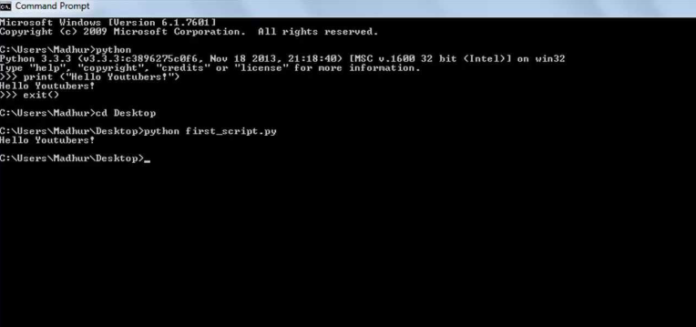
One of the simplest ways to learn execution is through the terminal or command prompt.
This method is especially helpful for beginners who want to understand the core process of running scripts manually.
When learning how to run code in python, the command line method gives you direct control over execution.
Steps to Run Code in Terminal
- Open Command Prompt or Terminal
- Type
pythonand press Enter - You will enter interactive mode
- Write your code and press Enter
Example:
The output will appear instantly below your code.
This method is great for testing small snippets and learning basics.
Running Python Script Files Easily
Once you move beyond small tests, you will start working with .py files.
These files allow you to write complete programs and save them for later use.
How Script Execution Works
- Write your program in a text editor
- Save the file with
.pyextension - Open terminal in the same folder
- Run the file using a command
This method is the foundation of real-world Python development.
Understanding how to run code in python using script files is essential for building projects and assignments.
Using IDEs for Easier Programming Experience
Integrated Development Environments (IDEs) make coding much easier by providing helpful features like auto-completion, error highlighting, and built-in execution buttons.
Instead of switching between tools, everything is available in one place.
Popular IDEs include:
- PyCharm
- Spyder
- Thonny
- Visual Studio Code
These tools simplify execution and help beginners focus on learning logic rather than setup.
Running Python in Visual Studio Code
Visual Studio Code is one of the most popular tools for developers today because it is lightweight and powerful.
How Execution Works in VS Code
- Install VS Code
- Add Python extension
- Open your
.pyfile - Click the Run button or press
Ctrl + F5
Output appears in the terminal section below.
When practicing how to run code in python, VS Code is often recommended because it combines simplicity and professional features.
Using Jupyter Notebook for Interactive Coding
Jupyter Notebook is widely used in data science and machine learning because it allows you to run code in small sections called cells.
Each cell can be executed independently, making experimentation easy.
Key Advantages
- Step-by-step execution
- Immediate output display
- Great for visualization
- Easy debugging
To run a notebook:
- Install Jupyter
- Launch using terminal
- Open browser interface
- Create new notebook
- Run cells one by one
This makes learning more interactive and visual.
Running Python Online Without Installation
If you don’t want to install software, online platforms are very useful.
They allow you to write and execute programs directly in a browser.
Popular Online Platforms
- Google Colab
- Replit
- Programiz Online Compiler
- PythonAnywhere
These tools are especially helpful for beginners who want quick results without setup complexity.
Comparison of Python Execution Methods
To make things clearer, here is a simple comparison table:
| Method | Difficulty Level | Speed | Best Use | Internet Required |
|---|---|---|---|---|
| Terminal | Easy | Fast | Small programs | No |
| IDE (VS Code, PyCharm) | Medium | Fast | Projects | No |
| Jupyter Notebook | Easy | Medium | Data science | Sometimes |
| Online Compiler | Very Easy | Medium | Beginners | Yes |
Each method has its own advantages depending on your learning stage.
Common Mistakes Beginners Make
When starting out, learners often face small issues that block execution.
Some common mistakes include:
- Missing indentation
- Typing errors in commands
- Not installing Python properly
- Forgetting file extensions
These errors are normal and part of the learning process. Fixing them improves your understanding of programming.
Debugging Tips for Smooth Execution
Debugging is an important skill in programming. It helps you find and fix errors quickly.
Simple Debugging Techniques
- Read error messages carefully
- Use print statements for checking values
- Break code into smaller parts
- Test step by step instead of all at once
These habits make coding smoother and more efficient.
Running Python on Mobile Devices
You don’t always need a computer to code.
Mobile apps allow you to practice anywhere.
Useful Apps
- Pydroid 3 (Android)
- Pyto (iOS)
- Termux (Advanced users)
These apps are great for learning basics on the go.
Best Practices for Beginners
To improve your coding journey, follow these simple habits:
- Practice daily
- Start with small programs
- Focus on understanding logic
- Avoid rushing into complex topics
- Experiment with examples
Consistency is more important than speed in programming.
Advanced Execution Concepts
Once you are comfortable, you can explore advanced topics like:
- Virtual environments
- Package installation using pip
- Automation scripts
- API integration
These skills are useful for real-world development projects.
Real-World Applications of Python Execution

Python is used in many industries, including:
- Artificial intelligence
- Web development
- Data analysis
- Cybersecurity
- Automation systems
Every application starts with understanding execution fundamentals.
Frequently Asked Questions (FAQs)
1. What is the easiest way to start running Python programs?
The easiest way is using an online compiler or a simple IDE like VS Code.
2. Do I need internet to run Python code?
No, once installed, Python works offline on your computer.
3. Why is my Python code not working?
Most issues come from syntax errors or incorrect setup.
4. Can I use Python on mobile?
Yes, apps like Pydroid 3 and Pyto allow mobile coding.
5. Which method is best for beginners?
Online tools and simple IDEs are best for starting learners.
Conclusion
Learning programming always begins with understanding execution. Once you know how programs run, everything else becomes easier to learn and apply.
We explored different ways to execute code, including terminals, IDEs, notebooks, and online platforms. Each method serves a different purpose depending on your learning stage and project needs.
Practicing regularly will strengthen your confidence and improve your problem-solving ability. Whether you are a student, beginner, or aspiring developer, mastering how to run code in python is your first major step into the world of programming.
Keep experimenting, stay consistent, and build small projects daily. That is the real secret to becoming skilled in Python programming.